
I’ve had a lot of interest in my blog from last year on Tips to Display Edge-to-edge Screen Content in an Existing Android App in both Jetpack Compose & XML. As the name suggests that post was geared around existing apps with a mix of Compose and legacy XML screens and how to manually handle a lot of the backwards-compatibility issues that we face when implementing edge-to-edge. It’s worth mentioning that you can now leverage the enableEdgeToEdge() API to address these issues, as described in the documentation:
The default style configures the system bars with a transparent background when contrast can be enforced by the system (API 29 or above). On older platforms (which only have 3-button/ 2-button navigation modes), an equivalent scrim is applied to ensure contrast with the system bars.For those new to edge-to-edge screen layouts on mobile it’s a modern technique to utilise the entire screen real estate, namely behind the top system and bottom navigation bars.
From androidx.activity version 1.8 or later you can access the enableEdgeToEdge() function for use in your MainActivity’s onCreate override:
override fun onCreate(savedInstanceState: Bundle?) {
    enableEdgeToEdge()
    super.onCreate(savedInstanceState)
    setContent { BmAppContainer() }
}
If we drill into it we can see the various backwards-compatibility issues for edge-to-edge are addressed individually for Android SDK levels from 29 down:
val impl =
    Impl
        ?: if (Build.VERSION.SDK_INT >= 30) {
            EdgeToEdgeApi30()
        } else if (Build.VERSION.SDK_INT >= 29) {
            EdgeToEdgeApi29()
        } else if (Build.VERSION.SDK_INT >= 28) {
            EdgeToEdgeApi28()
        } else if (Build.VERSION.SDK_INT >= 26) {
            EdgeToEdgeApi26()
        } else if (Build.VERSION.SDK_INT >= 23) {
            EdgeToEdgeApi23()
        } else
            if (Build.VERSION.SDK_INT >= 21) {
                    EdgeToEdgeApi21()
                } else {
                    EdgeToEdgeBase()
                }
                .also { Impl = it }
The API also provides optional parameters to customise the status and navigation bars:
Params:
statusBarStyle - The SystemBarStyle for the status bar.
navigationBarStyle - The SystemBarStyle for the navigation bar.
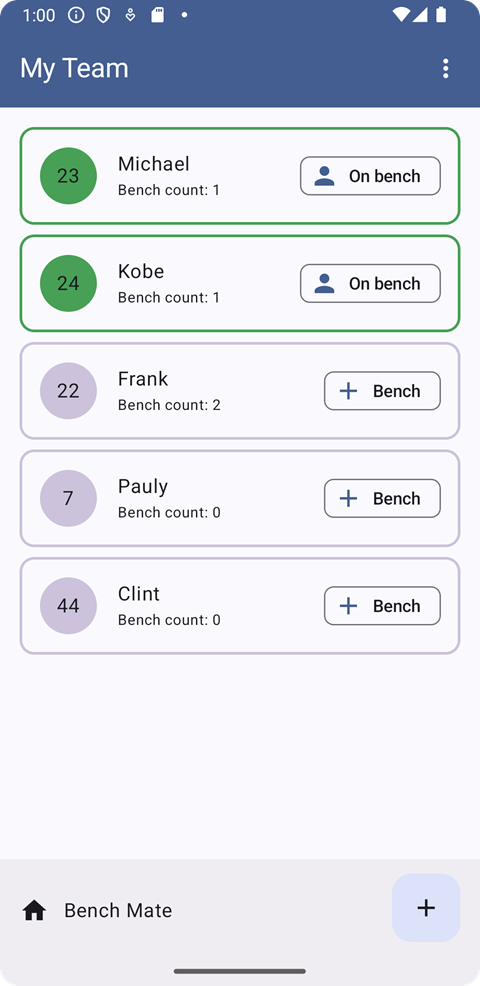
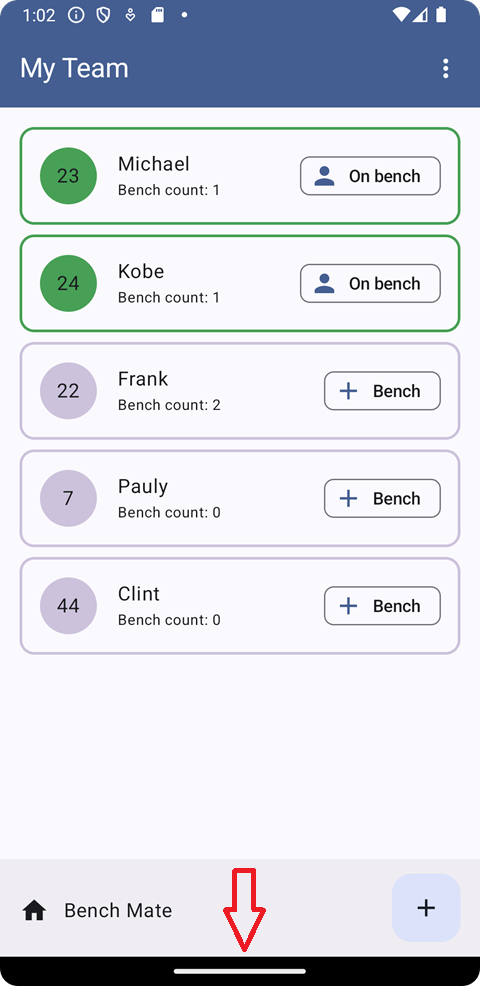
I’ve used enableEdgeToEdge() in my Bench Mate app, along with the Material Design 3 dynamic colour palette and Kotlin Multiplatform, and the screen content is properly applied to the edges as expected, namely for the bottom system navigation. In the examples below the screen on the right does not apply enableEdgeToEdge(); notice the black background along the bottom:
Hopefully this helps anyone that’s looking to implement edge-to-edge in an app that supports Android SDK versions below Android 11 (SDK 30).
Join the App Kitchen community on LinkedIn at https://www.linkedin.com/company/app-kitchen-dev/
 App Kitchen